In-Game Scorekeeping
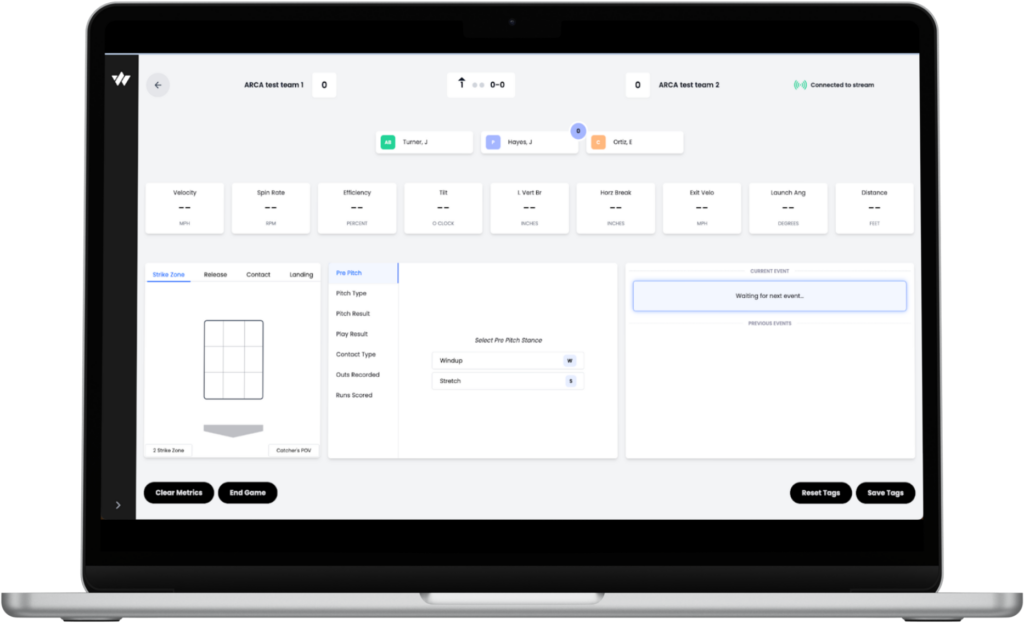
Scorekeeping during a SmartPark game captures the accurate game state and ensures the correct hitter/pitcher attribution on every pitch. The scorekeeper uses the SmartPark Ops scorekeeping interface throughout the game.
What to Tag on Each Pitch
- Umpire call on each pitch (ball, strike, foul, etc.)
- Count (balls and strikes)
- Runners on base
- Runs scored
- Play outcome at the end of each at-bat (single, double, ground out, fly out, error, etc.)
Critical Rule
On every pitch, confirm that the current pitcher is correct and the current hitter (at-bat) is correct. This is the single most important action a scorekeeper takes — it ensures that post-game data downloads accurately attribute performance to the right players.
Tips for Accuracy
- Track substitutions and lineup changes as they happen during the game.
- Keep communication open with the field operator about any system delays or issues.
- Position yourself in the press box, scorer’s table, or a field-side workstation with a clear view of the field and access to the SmartPark Ops software
Umpire Positioning & Movement
Operating the SmartPark ABS System
Balls & Strikes — LED Signals
- RED Strike
- BLUE Ball
If no call appears after 3 seconds, make a ball/strike call using your best judgment.
Fair or Foul — LED Signals
- GREEN Fair
- ORANGE Foul
LED displays a confidence percentage. 100% = extreme confidence | 0% = no confidence
- Confirm the LED board reads “Waiting for Pitch.”
- If yes, the game is ready to begin.
- If no, text [field name] to [WIN Reality cell number]. Wait 5 minutes. If unresolved, proceed with manual ball/strike calls and switch to ABS once a resolution is achieved.
- Stand behind the mound in a position that allows clear visibility of the LED board.
- After each pitch, look at the LED and signal the call. (Red = Strike / Blue = Ball.) If no call appears after 3 seconds, use your best judgment.
- You are responsible for signaling the count to the players on a pitch-by-pitch basis.
- The strike zone is pre-set and static based on the age level.
- The zone automatically expands by 0.5 baseballs when the run differential reaches 10.
Fair or Foul
- The umpire will make an initial judgment on a fair or foul call.
- The LED board also displays a call. (Green = Fair / Orange = Foul.) A confidence percentage is shown.
- The umpire may overrule their own judgment based on the LED.
- Overturning a fair call: decide after play is completed. Overturning a foul call: award bases at umpire’s judgment.
Pitch Clock
- The pitch clock provides guidance around pace of play.
20 seconds between pitches is the recommended pace of play. - The pitch clock is for advisory purposes only and will not be enforced with penalties.
Umpire Positioning
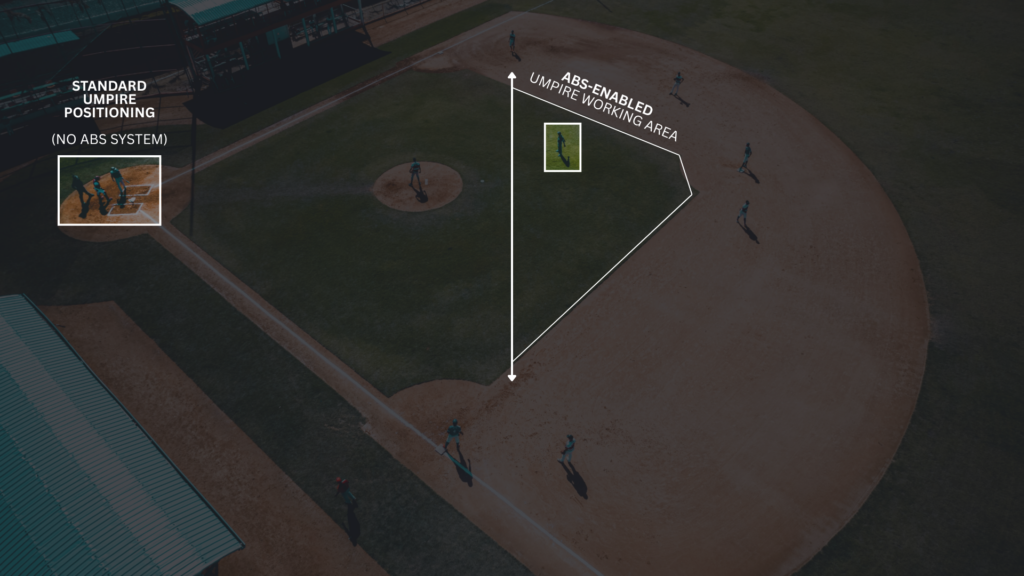
With the ABS system calling balls and strikes, the umpire operates from behind the pitcher rather than behind home plate.
The game-day umpire is generally positioned behind the pitcher, 8 to 12 feet behind and slightly to the side of the pitching rubber. The exact side depends on pitcher’s handedness: generally, the first-base side for right-handed pitchers and the third-base side for left-handed pitchers.
Positioning With Runners on Base
Runner on First: Slightly deeper (10–12 ft). Favor the third-base side, outside the right-handed batter’s sightline.
Runner on Second: Favor the first-base side, maintaining offset from center to stay outside the left-handed batter’s sightline.
Runner on 3rd or Bases Loaded: Balance central coverage while staying outside the direct batter-pitcher sightline.
Umpire Movement
The umpire may need to adjust their on-field location based on batter handedness or the location of hit balls.
Adjustment by Batter Handedness
- Right-handed batters: The umpire may shift slightly toward the first-base side to stay outside their line of sight.
- Left-handed batters: The umpire may shift slightly toward the third-base side to stay outside their line of sight.
The goal is always to remain in the working area while avoiding any position that could interfere with the batter’s ability to track the pitch.
Movement After Ball Is in Play
- Ground balls to infield: Stay in or near the working area and let the ball turn you toward the play.
- Balls hit to outfield: Advance toward the base where the play will develop.
- Balls near foul lines: Move toward the appropriate line to make fair/foul calls.
- Plays at home plate: Advance quickly from the working area toward home to get proper positioning on tags or force plays.
The working area serves as the umpire’s home base for calling pitches via ABS and provides the launching point for all subsequent coverage responsibilities throughout the play.
Ending the Game & Data Download
At the conclusion of each game, the SmartPark system will automatically end the game if the end time is set along with the game schedules during the pre-game portion. If this information was not set prior, the field operator formally ends the game and can immediately access a clean game dataset for analytics.
Ending the Game
- When the game ends, click End Game (located in the top right of the SmartPark Ops interface). This ensures the dataset contains only events from this game.
- Data captured throughout the game is automatically saved and stored without any additional steps.
Downloading Game Data
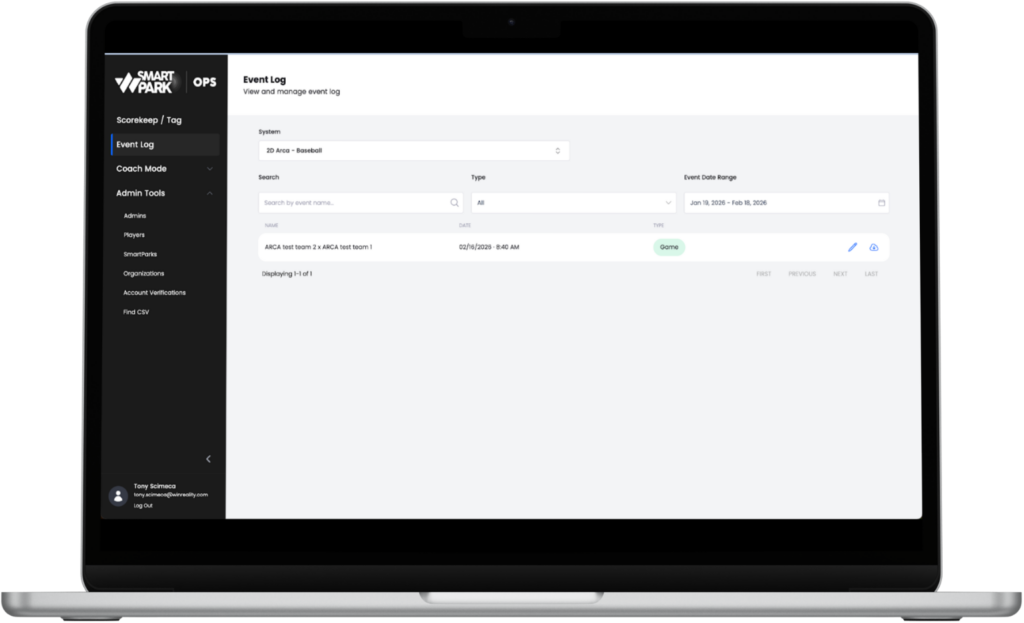
- Go to Event Log in the SmartPark Ops sidebar and select Download CSV for the game.
- The CSV auto-appears after the game ends.
- The export includes 200+ columns of pitch and hit metrics.
- If players were tagged during at-bats, the CSV will include who was pitching and hitting on each event.
- Use the CSV to build any analysis or views you need for post-game review.
Download the Guide (PDF) below for more information on SmartPark Ops live and post game workflows.