You have 12 to 18 hitters, two cage stations, and 90 minutes of practice. The best baseball analytics tools for coaches in 2026 tell you exactly what each kid should work on at practice. For data-literate youth and high school coaches, the strongest combination is WIN Reality’s SwingAI plus Blast Motion for hitting development, layered with an in-game system like SmartPark for game data and a specialized tool or two for pitching, scoring, and recruiting. This guide ranks tools by the coaching decision they improve, not by feature count.
Coaches keep describing the same frustration online: the numbers pile up, but nobody tells you what to fix. Team stats apps track numbers well, but they do not tell you to go run a specific drill tomorrow. That gap between raw data and a coaching action is the whole game, and it is the lens we use below.
The Best Stack at a Glance
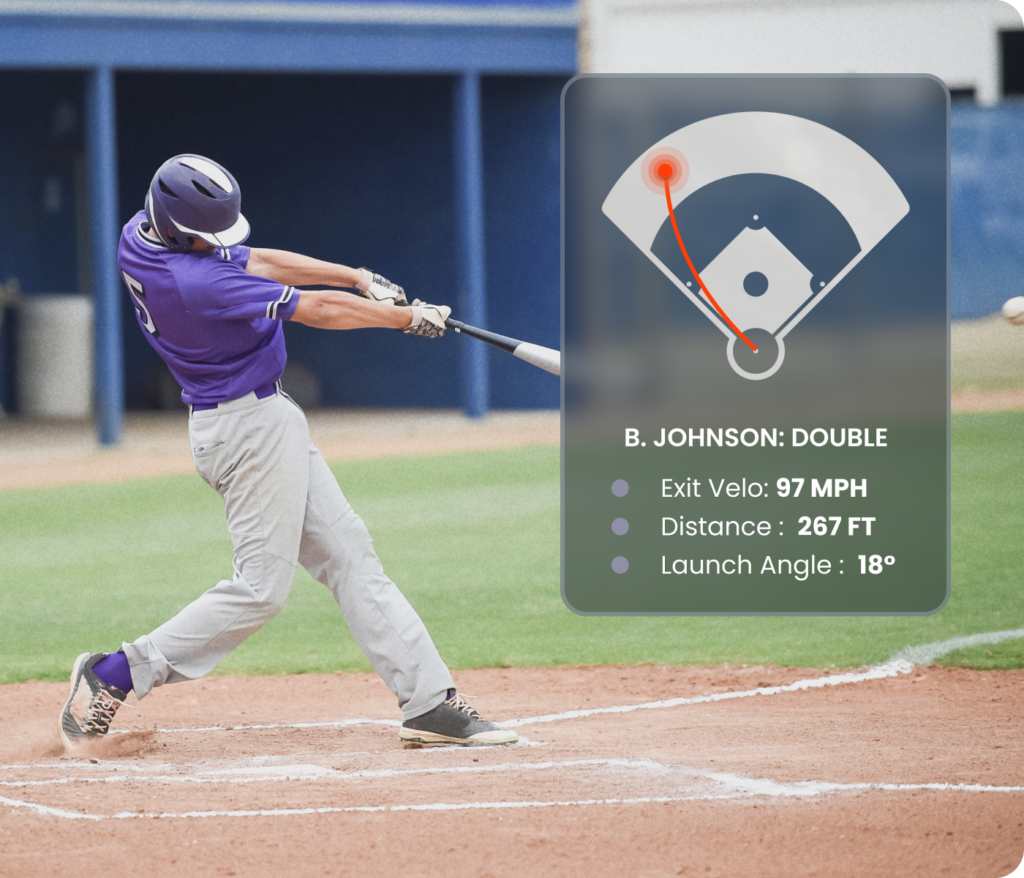
If you only build one hitting stack in 2026, pair SwingAI with Blast Motion. SwingAI turns a phone video into an AI biomechanic breakdown and specific cues. Blast’s bat-mounted sensor captures swing metrics like bat speed, time to contact, and attack angle, with auto-clipped swing video and overlaid metrics.
For everything else, add tools by job:
- Game data and trends: SmartPark for installed fields, plus a team scorekeeping app for stats and spray charts
- Pitching and batted-ball data: a portable ball-flight monitor or a high-end ball-tracking system
- Team logistics: a team scheduling and messaging app
- Public benchmarks: MLB’s free Statcast data through Baseball Savant
No single app does it all. Build a small stack, keep the data confidence-building for young players, and always convert a metric into one adjustment per hitter.
How to Evaluate Baseball Analytics Tools for Youth and High School Coaches in 2026
Most “best baseball apps” lists lump scorekeeping, lineup generators, and swing sensors into one pile. That is useless when you are deciding where to spend $200 and 20 minutes of practice. Evaluate tools by three filters: the decision they drive, whether they hand you an action or just a dashboard, and whether the data quality and cost fit your age level.
A. Match the Tool to the Coaching Decision
Start with the decision, then pick the tool. Every analytics purchase should map to something you actually do as a coach.
- Lineups and matchups: SmartPark data, team scorekeeping apps
- Pitch counts and arm care: SmartPark data, team scorekeeping apps, and MLB and USA Baseball’s Pitch Smart guidelines
- Swing mechanics and hitting development: SwingAI, Blast Motion
- Practice planning: SwingAI (cues and plans), Blast (drills by metric)
- Recruiting and showcases: portable ball-flight monitors, high-end ball-tracking systems, bat-sensor tools
- Team logistics and parent communication: team scheduling and messaging apps
If a tool does not clearly improve one of those decisions, skip it. A hitting dashboard that never changes your Tuesday practice plan is a subscription you are wasting. Write down the decision first, then buy the tool that moves it.
B. Separate Raw Data from Coaching Recommendations
There is a real difference between a dashboard and a next step. Coaches consistently say they do not want a wall of metrics; they want to know what to work on at the next practice. That frustration is your buying signal.
Blast is upfront about this too. Its guide notes that swing metrics are not grades but a feedback system, and that the players and coaches who improve fastest treat each number as a question, not an answer.
Here is the practical rule with 15 hitters and limited cage time:
- Raw-data tools (Blast, ball-flight monitors, scorekeeping apps, SmartPark) tell you what is happening
- Recommendation tools (SwingAI) tell you what to do about it
- You need one actionable adjustment per hitter, not ten metrics per hitter
Pick tools that shorten the distance from number to drill. That is where SwingAI earns its spot.
C. Check Data Quality, Cost, and Age-Level Fit
Bad inputs create bad plans. Stats are only as good as the person who keeps them, and small-sample game numbers make a shaky basis for specific drills given variable entry quality and fielding. A parent scorekeeper’s “hard-hit” tag is not a mechanical measurement.
Guard against three traps:
- Scorekeeper bias and small samples: Do not set lineups off 8 to 12 plate appearances of manually entered data
- Cost tiers: Free apps, phone-only AI, bat sensors, and radar or camera systems are wildly different price points, and hardware can sit behind paywalls or subscriptions
- Age fit: For 8U to 12U, keep analytics confidence-building, not evaluative. Save exit-velocity leaderboards for high school and recruiting
For context on cost creep, some sensor features have moved behind paywalls or subscriptions across the category, so read the subscription terms before you buy. Match the data quality to the stakes: the younger the player, the lighter the analytics.
Ready to turn swing data into a practice plan your hitters can use tomorrow?
Best Baseball Analytics Tools and Methods for Coaches in 2026
Here is the ranked toolkit, organized by the coaching job each tool actually does.
Method 1: SwingAI + Blast Motion for Hitting and Swing Development
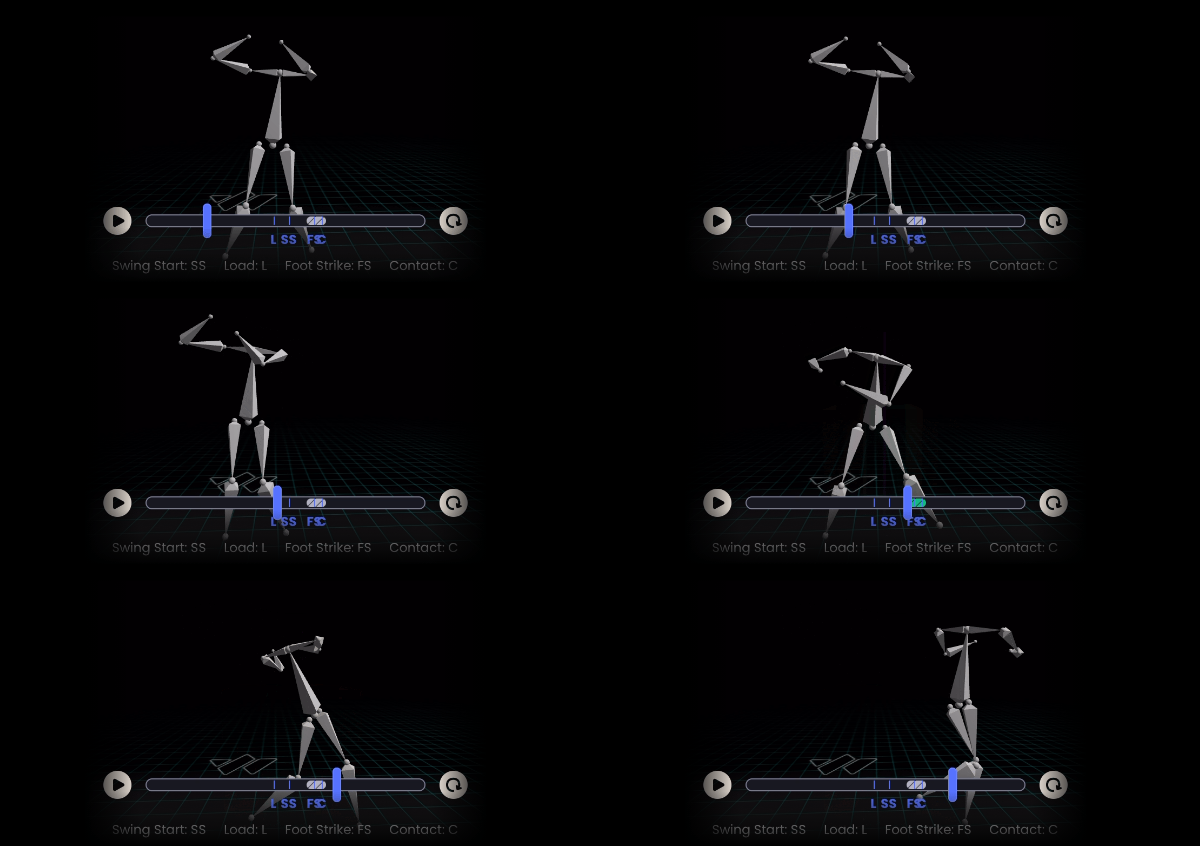
This is the pairing that fixes swings. Blast gives you objective swing metrics from a sensor, and SwingAI turns video into a biomechanic breakdown plus the cue and plan to fix it. Together they cover both halves of the problem: measurement and instruction.
What Blast Motion does well. You attach the sensor to the knob of the bat with no setup or calibration necessary. Blast reports three swing quality scores (Plane, Connection, and Rotation, or PCR) on a 20 to 80 scale, based on relative measurements of similar age groups and skill levels. For bat speed benchmarks, Blast lists Pro at 66 to 78 mph, High School Varsity at 60 to 70 mph, and Middle School at 46 to 62 mph.
What SwingAI adds. Upload a swing video and SwingAI returns an instant AI biomechanic analysis with personalized cues and an improvement plan, with unlimited analyses and progress tracking. Important distinction: SwingAI scores 12 biomechanical dimensions across the swing (things like Negative Move, Pelvis Load, Hip Shoulder Separation at Foot Down, and Pelvis Direction at Contact). It does not measure Blast’s plane, connection, or rotation metrics. Use each for what it is built for.
How to run both in one cage session:
- Take Blast readings for bat speed and attack angle to flag the what
- Record the same swings and run SwingAI for the why and the fix
- Assign one drill per hitter based on the flagged dimension
If Blast shows low bat speed and SwingAI flags low Max Hip Shoulder Separation, prescribe the Torque Drill plus the Knob to Knee Drill. If you see casting or the barrel leaking away from the body, run the Stop at Contact Drill with the cue “short to it, long through it.” Measure again in two weeks and let game at-bats confirm the work.
Method 2: SmartPark and Team Scorekeeping Apps for Game Data and Team Trends
Your season data lives here, and two different kinds of tool fill it.
SmartPark is an installed field system. Fixed cameras track every pitch, and the field runs Automatic Balls and Strikes, a pace-of-play clock, and scoring, with live game data pushed to coaches, players, and parents and 125+ live metrics captured per game. It is built for fields and organizations, not for a single team’s scorebook.
Team scorekeeping apps handle the team-level layer: scorekeeping, live updates for parents, spray charts, stat exports, and opponent tendencies. Some third-party apps also reinterpret scorekeeping data into scouting and pitch-count views.
Use them for what they are good at:
- SmartPark: automated calls, clock, scoring, and live game data on connected fields
- Scorekeeping apps: detailed box scores, spray charts, and stat exports
- Pitch-count tools: arm-care tracking aligned with Pitch Smart limits
But respect the limits. Game-entered data carries scorekeeper bias and small samples, and coaches routinely warn that these numbers make a weak basis for specific drills. Coaches also commonly report re-entering stats by hand every weekend just to analyze them the way they want. That is a sign the data is descriptive, not prescriptive.
Treat this layer as your scoreboard, not your development plan. Use it to set matchups and manage arms, then hand mechanics work to your Method 1 stack.
Method 3: Specialized Tools for Pitching, Recruiting, and Logistics
Once your hitting and game-data layers are set, add specialists only where you have a specific need. These tools solve narrow problems well and cost more when they involve hardware.
- Portable ball-flight monitors: pitching and batted-ball tracking (spin, velocity, launch) for bullpens and showcases
- High-end ball-tracking systems: radar and optical tracking, typically bought at the program or institution level
- Other bat-sensor tools: another option in the swing-sensor category
- Team scheduling and messaging apps: RSVPs, schedules, and parent communication (logistics, not analytics)
- Baseball Savant: free public MLB benchmark data
Baseball Savant is your free reference for what elite outcomes look like. Savant’s search page lets you query MLB’s Statcast database on a per-pitch, per-game, per-player, per-team, and per-season basis. Use it to teach concepts like hard-hit rate and attack angle, not to grade a 12-year-old.
For high school programs, confirm your state’s rules on in-dugout electronics and communication devices before you build any in-game data workflow. Buy specialists last, and only when a clear decision demands them.
How WIN Reality Helps
Picture your third hitter: good bat speed on the Blast readout, but he keeps rolling over outside pitches in games. Blast tells you the ball flight is off; it does not tell you his pelvis is opening early. SwingAI does, and it hands you the cue and the drill to fix it. That bridge from swing video and metrics to an actual hitter development plan is exactly the gap coaches say they need filled.
SwingAI scales one great hitting coach across a full roster. Instead of eyeballing 15 swings and hoping, you get a consistent, AI-driven read on each hitter’s 12 biomechanical dimensions, plus the language to coach it.
Where it fits your week:
- Weekly: one SwingAI upload per hitter, one cue, one drill
- Monthly: re-check the flagged dimension and progress tracking
- Seasonally: confirm gains against game outcomes from your scorekeeping data
Ground the mental side too. A hitter thinking about mechanics in the box usually freezes, so mechanics work belongs in practice and conviction belongs at the plate. On approach, the two-strike numbers make the case: league average drops to .165 with two strikes, and cutting swing-and-miss can add 15 to 20 hits over a season. Pair SwingAI mechanics work with a two-strike plan and you are coaching both pillars at once.
SwingAI
SwingAI is WIN Reality’s AI mobile app for hitting development. You upload a swing video and get an instant AI biomechanic analysis, personalized cues, and an improvement plan built around the swing’s 12 dimensions. It runs on a subscription with unlimited analyses and progress tracking, so a coach can review a full roster without buying hardware for every player.
For programs that want game-speed reps to match the mechanics work, SwingAI also bundles with TrainVR and the WIN bat attachment in the Ultimate Hitter Pack at a significant first-year discount when purchased with hardware add-ons.
What SwingAI Gives Coaches
- AI-powered swing analysis: video in, biomechanic breakdown out across 12 dimensions
- Individualized hitter insights: personalized cues matched to each swing’s flaw
- Swing video review: upload and analyze from any phone, unlimited analyses
- Practice recommendations: cue plus drill so every metric becomes a Tuesday action
- Coach-scalable workflow: consistent reads across a 12 to 18 player roster with progress tracking
Every feature points at the same outcome: fewer walls of numbers, more clear next steps.
Keep Reading
- SwingAI product page
- How youth baseball coaches can use AI swing analysis
- Best baseball training apps 2026
Turn Swing Data into Better Practice Decisions
Stop collecting metrics you never act on. Build the SwingAI plus Blast stack, assign one adjustment per hitter, and let your next game confirm the work.